
Have you been thinking about starting a blog but you’re not sure about how to set up a blog. It’s either because you lack some superior computer skills or you’re a computer guru who is yet to settle on the right CMS or theme to use on your blog. Whatever your situation, you’ll need a detailed guide on how to set up a blog faster.
In this guide, I’ll show you how to start and promote your blog. And most importantly, I will show you how to start a WordPress Blog on Eco Web Hosting. So, make some coffee, take a pen and a notebook, and be ready to learn some new stuff.
Why you need to start a blog
There is always an inspiration behind every blog.
Whether it’s money, expanding your hobby or it’s an obligation your organization has to meet.
Well, money is the most common motivation for most bloggers. But before we get to the money part, there are other benefits of blogging.
So, what will a blog do for you as an independent content creator or as an organization?
- You can use a blog to document your thoughts which can be a source of motivation to your audience.
- Blogging is a smart strategy to build an online brand.
- You can use your blog to sharpen your writing skills or a portfolio if you’re an established writer already.
- You can meet new people. For instance, if you’re blogging about marketing you’ll be in a great position to meet other marketers.
- A blog can be a source of income through selling products, writing services, or any service related to your blogging topic. Additionally, you can earn a living by promoting other people/brands’ products (affiliate marketing).
To reap the benefits I have mentioned above, follow this guide and create a blog in less than an hour. No qualifications are needed, just follow the steps.
How to Start and Promote WordPress Blog in 8 Simple Steps
Step 1: Choose a perfect blog topic (Niche)
First, you have to settle on a topic you want to talk about on your blog.
However, picking a niche as a new blogger is hard.
You probably have no idea what to write about or you have a topic but you’re not sure if it will work.
You may be wondering why you have to find a niche. Well, you can’t just post your random thoughts.
It doesn’t work like that –you’re writing for an audience and there’s no guarantee that they’ll love you random articles. There has to be consistency in the kind of content you write and your target audience.
A quick one:
Think about your favorite blogger.
Do you keep reading their content because they write about everything?
I’m sure you love their content because they focus on a topic you love or interest you. That’s why your blog should target a specific audience.
Here is a process you can use to pick a niche that works for you and inspires your audience.
- Think about topics that you enjoy talking about like parenting, relationships, cars, fitness, Yoga, or cooking.
- Do market research about topics that are trending and profitable at the same time.
- Write down the things you’ve accomplished lately that could excite your audience. For example, you managed to see all your dream travel destinations or your successful weight loss journey – this could be documented in a blog.
- Go to amazon and check the most popular books (you’ll get a glimpse of what people are reading).
To be honest, I have always used the above process to come up with topics for my blogs.
When choosing a topic for your blog, ensure that it’s something you love or enjoy talking about. That way, you won’t be struggling to develop content for your blog.
Step 2: Choose a domain name
A domain name is an address your followers can use to get to your blog on the web.
So, it’s vital to name your website so that you can stand out from other bloggers in your niche. If you’re not sure about what name to use, consider the following suggestions for a domain name that suits you.
- Make sure it’s easy to pronounce and spell
- A short name works better. Long names put off people and they will avoid your blog.
- If you’re still confused, use your name or if your initials work. Also, you can add variations like biz, blogger, or writes.
- You can use your social media names. For example, if you have a Facebook page you can use that name.
- Consider a name related to your niche. For instance, if you write about fashion, you can have a name such as fashionblogger.com.
The best part is that you can register a domain name for free using my link on Eco Web Hosting.
Step 3: Choose the right blogging platform
A blogging platform enables you to publish and manage your content. You’ll find several of them online but ensure you pick the right one.
There’s Squarespace, Weebly, Tumblr, Wix, and WordPress.
None can rank as the worst blogging platform but one of them stands out from the rest, WordPress.
WordPress is the go-to content management system and has a large community of users.
There are two types of WordPress, WordPress.com, and WordPress.org.
The difference is that one platform gives you the freedom to host your blog, while the other is a hosted platform.
WordPress.org is a self-hosted platform. Meaning, you have the freedom to host your blog files and run your website the way you want. WordPress.com on the other hand is a hosted platform that limits users on the things that they can do with their websites.
Pro Hint: WordPress.com vs WordPress.org: Key Differences and Which One You Should Use
So, which one is the perfect WordPress platform to build a blog on?
The answer is WordPress.org.
This blog, divibanks.com, is built on WordPress.That means I’m in charge of monetizing this blog and I can customize it to my liking.
Lastly, it’s easier to get technical support on the official site, Youtube tutorials, WordPress boot camps (WordCamps), or social media communities.
Step 4: Buy a hosting plan on Eco Web Hosting
When choosing your hosting provider you have to ensure they are reliable and secure.
I recommend Eco Web Hosting because it’s one of the most popular and supportive hosting providers for aspiring bloggers out there.
You must be wondering, why you should pick Eco Web Hosting.
Here are some awesome features that make it a wonderful hosting provider
- Do you want a free domain?
Yes, Eco Web Hosting provides free domain to its customers which is uncommon for other hosting companies. Sign up using my special link and register your domain for free and save $12-15 or more.
Free domain registration is a good thing for an upcoming blog especially if you’re on a tight budget.
- Get 24/7 customers support
Eco Web Hosting provides excellent customer service around the clock. Such customer service is great, especially for new bloggers. They can solve your concerns via live chat, phone, support tickets (my favorite), articles, and webinars. I have used the chat and the support ticket so many times and they have proved to be very helpful.
And, their support page is very resourceful.
- You can install WordPress Instantly
WordPress is a content management system and is the most preferred even by top bloggers. Eco Web Hosting provides 70+ One-Click Installs, and WordPress is among them. So, if you choose Eco Web Hosting, you can install WordPress automatically without having to sign up.
- 45 Day money-back guarantee
Eco Web Hosting is dedicated to offering a risk-free hosting service to bloggers. If you change your mind within 45 days, you can ask for a refund. No questions asked.
Step 5. Affordable hosting plans
If you are on a budget, no worries you can start a blog for as low as £3.49 a month. That means you can start a business with just £40.
So let me guide you on how to set up a blog on Eco Web Hosting.
Choose a plan
Log in to the Eco Web Hosting website and click the big blue button that says ‘CHOOSE A PACKAGE’. On the next page, you will see all the hosting plans.
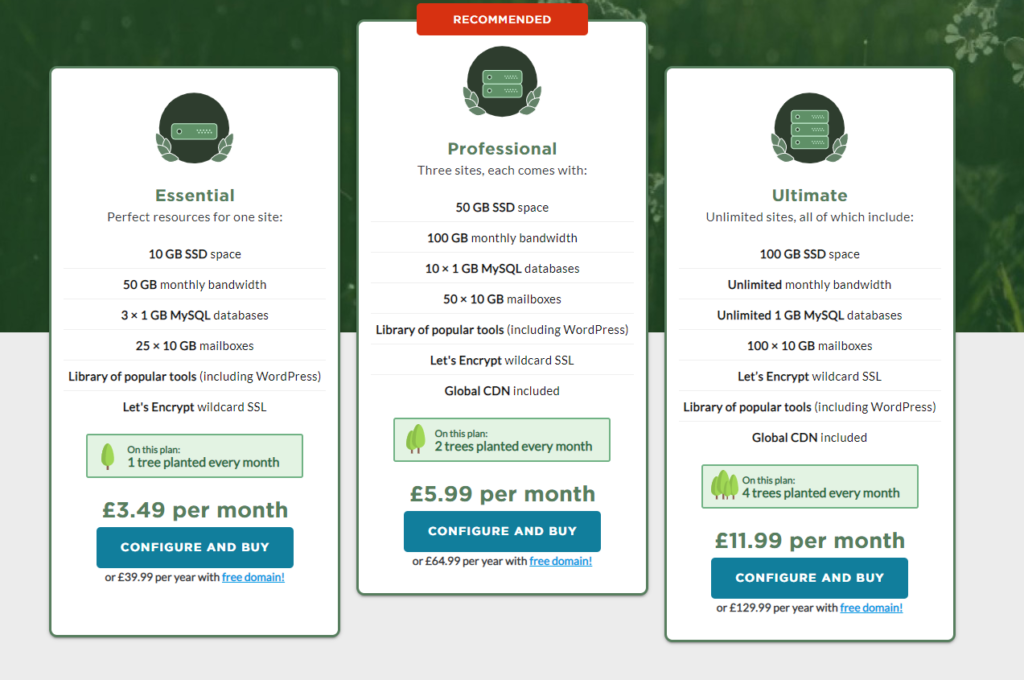
You will notice that there are three main plans: Essential, Professional, and Ultimate. The plan you pick depends on the size of your business needs and how much money you have. For example, if you want to use your blog as a big e-commerce store, it makes sense to pick the Ultimate plan.
If you are a new blogger, the Essential plan is the best option considering you may not have a heap of cash to get started.
Register your domain
Remember I mentioned a domain name for your WordPress blog?
Eco Web Hosting allows you to choose a domain name. You can register your domain as a dot com or any other top-level domain. However, dot com is the best option since it does not limit your audience by location.
What happens when you purchase a web hosting package is that you receive FREE domain credits that you can use later to purchase your domain name.
Eco Web Hosting, on their support page, made an article on how to use the FREE domain credit. You can check it out once you are ready to claim your free domain name.
You can skip this step if you can’t settle on a name yet and fix this later after filling your account details.
Account /payment details
After you pick a plan, fill in your details to set up an account on Eco Web Hosting. While at it, select a package that will last you for a long time. Let’s say a year (you will not worry about hosting for 12 months!)
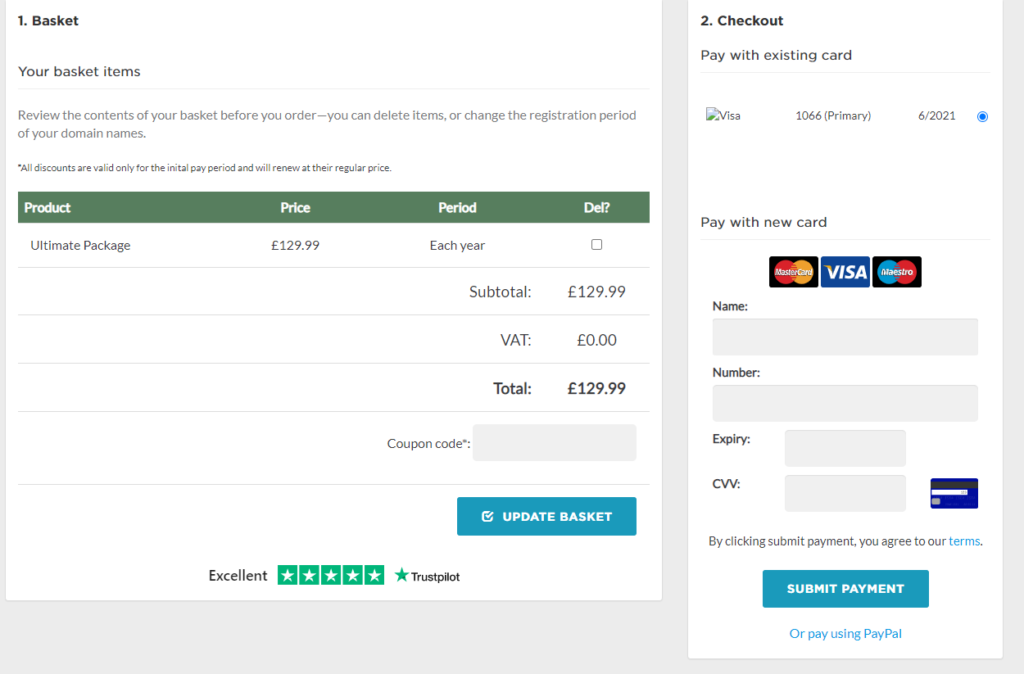
The best part is that you can also pay using PayPal.
Step 6: Install WordPress and customize your blog
Once you have completed the payment process, and that your web hosting account has been activated, you can log on to the control panel and start installing WordPress.
But first, you will need to create a hosting package.
On the Customer Area, click on “Create a Hosting Package”.
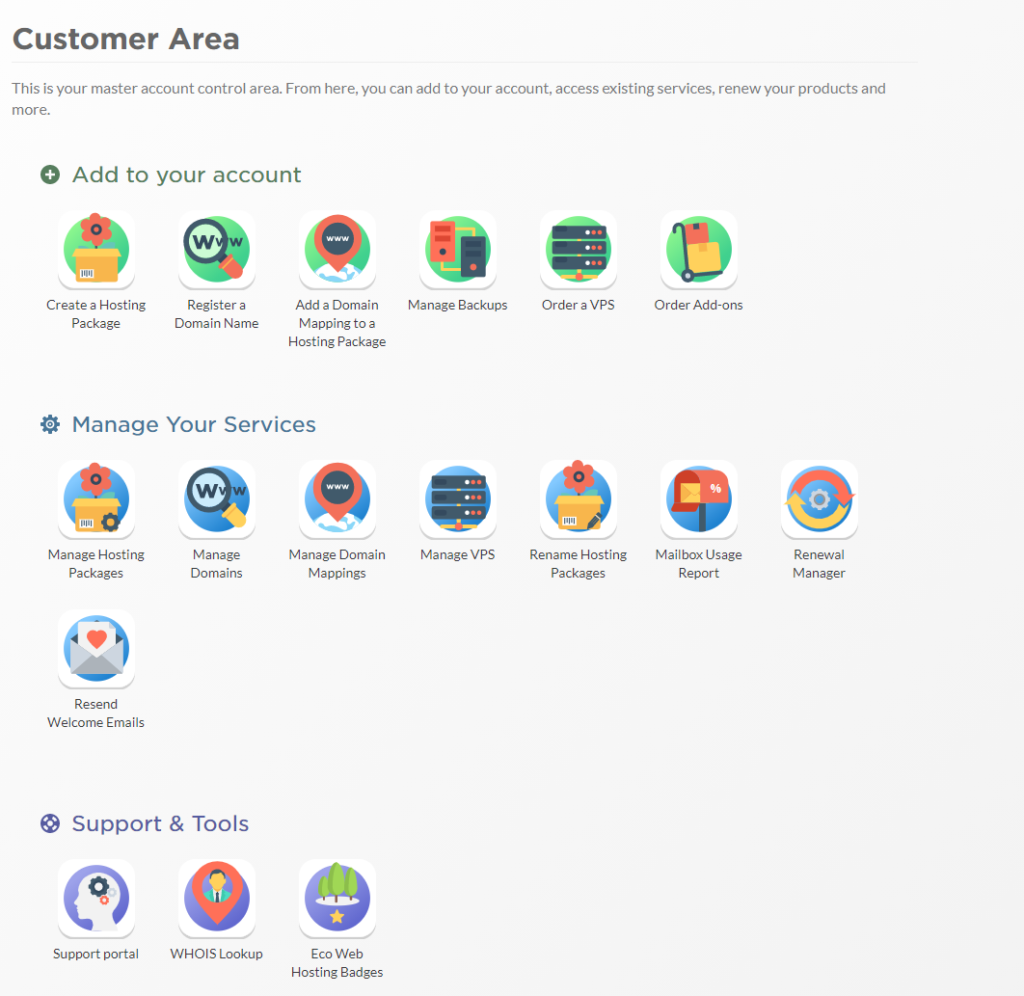
You will be taken to a page that looks like this:
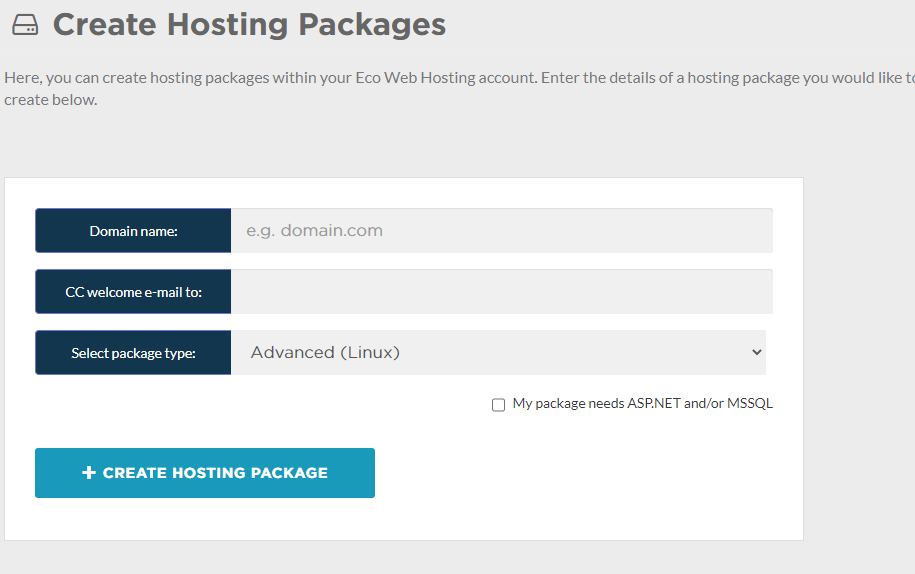
Enter your domain name and your best email address.
If you purchased your domain name from somewhere else, e.g. Godaddy, or Namecheap, ensure that the nameservers point to Eco Web Hosting Servers.
You can change the name servers to:
ns1.eco-dns.co.uk
ns2.eco-dns.co.uk
ns3.eco-dns.co.uk
ns4.eco-dns.co.uk
Once you have successfully created a hosting package, you can click on “Manage Hosting Packages” then click on CP Login link of the one you have just created.
You will be taken to the sctckcp page that looks like this:
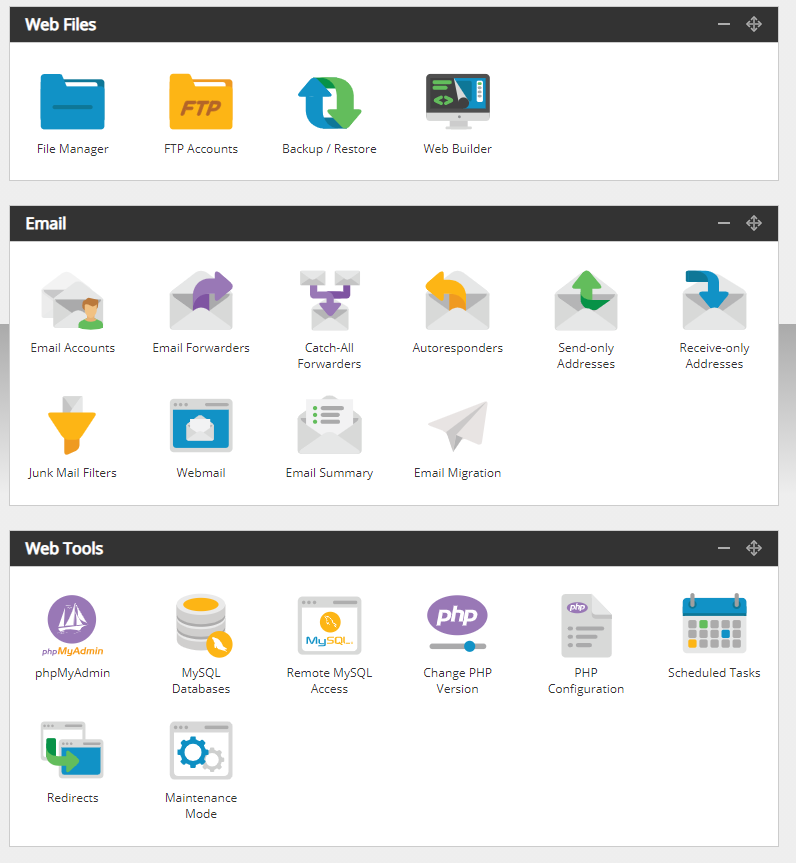
From within the StackCp area, you can create email accounts, activate SSL certificates, install WordPress and do much more.
To install WordPress, scroll down to the Oe-Click Installs, then click on the WordPress icon.
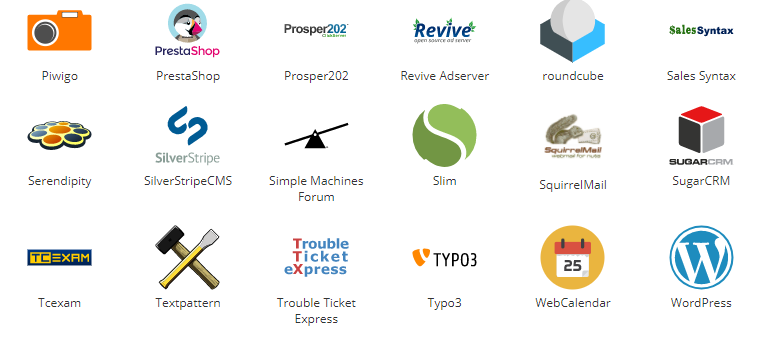
On clicking the WordPress icon, you will be taken to a screen that looks like this:
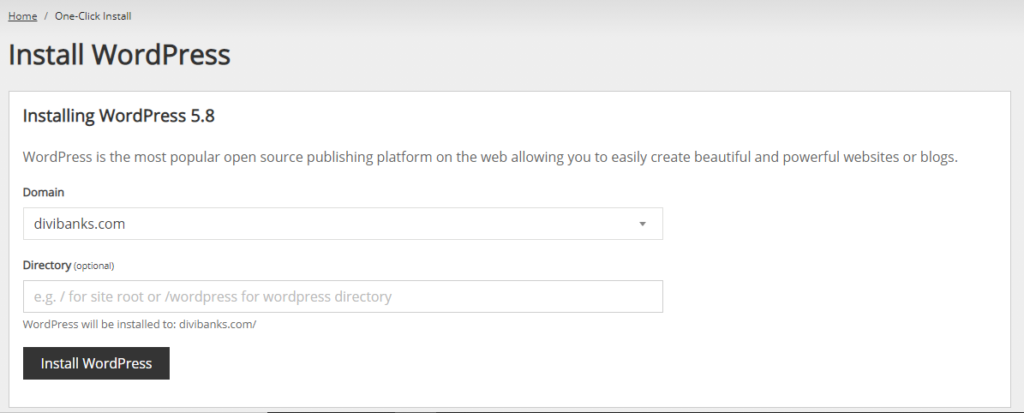
If you want to install WordPress on the main directory, do not write anything in the Directory box. Leave it blank. But, if you wish to install WordPress on a different directory, you can go ahead and name your directory.
For example, Divi Banks website is on the main directory. If I wanted to have another WordPress website on the same domain, I’d have it on a different directory. Something like /shop or even /podcast. So that in the end, I’d have a website with divibanks.com/podcast.
Since you are just getting started, and probably this is your first website, I’d advise that you leave the directory box blank, to allow the WordPress installation to occur in the main directory.
Click on the button Install WordPress to go to the next step.
You will be taken to a screen where you will have the option of choosing work with installation on the main domain or on a subdomain (staging environment). Click on the main domain name to choose your language.
You will then be taken to a screen where you will be required to add your website’s login information:
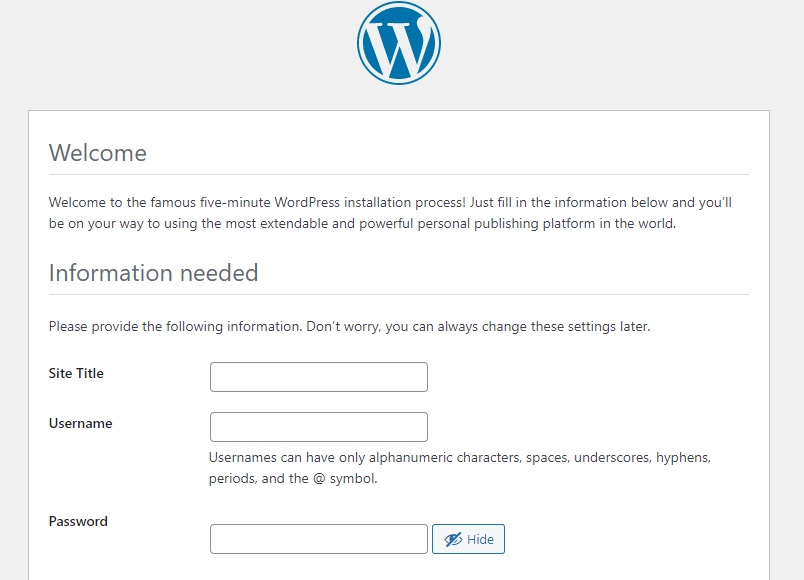
On this screen, make sure that you enter the right information, create a strong password, then click on the button, Install WordPress.
Hurrayyyyy… that’s it. You are now a WordPress blog owner.
To log in, and start customizing your blog, go to yourblog.com/wp-admin. Use the login credential you created in the above step.
Step 7: Install essential plugins
Plugins provide additional features for your blog to be more functional.
For example, to embed your social media accounts on your blog you will need a plug-in like social share to make that happen. To install plugins you will use your WordPress dashboard plugin section. The main benefit of plugins to bloggers is to allow them to perform some tasks easily.
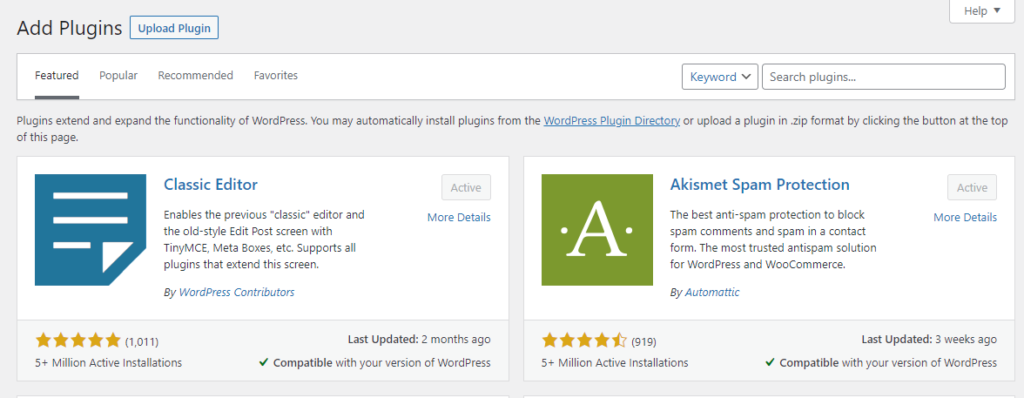
Here are some plugins that are perfect for your WordPress blog:
Yoast SEO
The first thing you do when searching for new information is to consult Google. But you only read the information on the first page of google. The articles you’re reading rank first on google because they are optimized for search engines. Yoast will help you create content that is optimized for search engines like Google.
WP forms
How will people contact you? WP forms will enable you to create forms where your followers can send a message or make general information. Ensure you ask only for the relevant info like first name and email address. Of Course with a promise to spam your readers with unnecessary emails or share them with a third party.
Akismet
When your blog posts gain popularity you will start to receive comments from your audience. Some are lovely and encouraging whereas some readers fail to be respectful. Akismet filters such comments which is safe for both your blog and your audience.
WooCommerce
WooCommerce is for bloggers with a plan to set up an online shop. Its been used by over 4 million websites and provides the most installed e-commerce plugin on WordPress.
Simple Author box
It’s not enough to write a post to write an article and publish it without providing author information. Readers tend to be curious about the writer and want to know more about you. The simple author box puts the author bio in such a beautiful way.
Step 8: Publish your first blog post
Now that your blog is live, create content for your audience. It’s content that keeps visitors coming back to your blog for more.
Start by creating blog posts that resonate with your audience. In other words, content that evokes emotions and encourages readers to take action.
As much as writing may be new to you, quality articles matter and they reveal much about you.
To write attractive posts, learn some editing skills, and use helpful tools like Grammarly editor to proofread your work. Also, you can use Pixabay and Unsplash to add killer images to your blog posts.
Step 8: Promote your blog
Making a blog doesn’t end with writing and publishing blog posts. You’ve to promote your content to your audience to gain a following and an income.
There are many ways available on the Internet to market your blog. However, you don’t have to burden yourself with all the marketing tactics.
Before you pick a marketing strategy, consider your audience, your blogging niche, and the accessibility of marketing platforms. For instance what platforms can you use to reach your target audience? Does your niche fit your marketing avenues?
Let’s explore different methods you can use to share your blog content.
Set up social media accounts
Do you follow your favorite bloggers on social media? Probably that’s where you discovered their blog and decided to follow them religiously on every social platform you’ve joined.
Social media marketing is an effective marketing method because you can share your blog posts instantly and reach a lot of people.
But think about it, there is a growing number of social media apps.
Do you open an account with each app?
Of course not.
Managing several accounts is overwhelming especially for a budding blogger. See, you don’t have money to hire writers, editors, and social media managers.
The best way to do social media marketing is to pick what’s relevant for your business. For instance, you can research the social platforms your target audience is likely to use.
For example, if you blog about traveling, an Instagram and a Facebook account would be a good idea. Additionally, you could make travel videos on YouTube and link them back to your blog.
Also, if you’re into professional or skill-based topics, Pinterest, LinkedIn, Facebook or Twitter will be suitable. For example, you can make pins on Pinterest showing people how to start remote work.
If you can blend your content with some humor, try TikTok videos.
Network
Networking is more old school but it can be done online.
It’s simply making friends online and encouraging them to share your blog posts on the social pages. However, note that there’s a difference between a genuine friend request and being a creep on the internet.
There’s a nice way of asking people to share your content without spamming their inbox or email. So how do you network with other bloggers without offending them?
One of the best ways is to start by commenting on their blog and following them on Social media. When you get to send emails and messages it will not look invasive to them because you’re no stranger.
Alternatively, you can offer to do a guest post on their blog especially if they are several steps ahead of you.
Grow an emailing list
By now you must feel like I’m asking you to do too much work.
Yes, launching a blog is easy but you need a strategy on how to stay afloat for long. Email marketing will involve sending emails to your audience encouraging them to share your post or your upcoming project.
To make that possible you will need to sign up for email marketing software.
Here are two providers I will recommend:
Mailchimp
Are you planning to use your blog as an extension to your already existing business? Mailchimp will enable send emails like pro owing to its numerous features compared to Mailerlite.
I’m talking about data-oriented software that uses a machine-learning algorithm to make your email segments a success. For example, you can establish if a customer will stay on your list or even buy your products.
So Mailchimp is for the blogger who is ready to keep up with the ever-evolving complex features on Mailchimp. However, it is easy to learn the ropes quickly because of the numerous templates and resources on the site.
Mailerlite
Mailerlite is made for small businesses and solopreneurs. It’s the answer if you are looking for a platform to send your weekly newsletters without having to lose your mind.
Additionally, Mailerlite wins the game when it comes to excellent customer support. Customer service is needed especially for new bloggers who need maximum technical support.
In a nutshell, Mailerlite has enough features to enable you to generate leads and sales on your blog and tons of digital marketing resources.
Now you know how to create a blog for your business or just a place to share your inspirational thoughts. Besides, you know what steps to take even after publishing the first article on your blog. Now that I’m sure you’re celebrating your new blog, tell me more about your blog in the comment section. Also, ask me questions on how to manage your blog. You need a hand, do not hesitate to reach out.


This is comprehensive. Thanks for sharing. I think I’ll have to give Eco Web Hosting a try. They seem like a good host.
Thanks, Julianne. Yes, you can give it try. They are a good host.
This is nice.
I have a request, though. Could you please do a video tutorial of this article…. it would really help.
Hello Annita. Thanks for your comment.
Yes. I’ll definitely do a video tutorial.
The tutorial is simple and easy to follow. Thanks for sharing.
Thanks, Mike.
Loot that. A nicely done tutorial. This eco web hosting seems like a great host. I’ll have to give it a try.
Thank you. Yes, ECO WEB HOSTING are great. You should definitely give them a try.
Absolutely wonderful. Thanks for sharing.
Thanks, Joash.
I came across your work on Divi Marketplace. And now this article. Absolutely amazing. Keep doing what you are doing. 💙💙
Thank you so much Hansa
Wonderful post.
Thank you Jonas.
This is very motivational and informative for anyone who wants to start their own WordPress Blog. It gave me a clear idea of where to start and what to work on. Thank you, Patrick!
Hello Janet. Thanks for stopping by. I’m glad you find this post helpful. You are so welcome.
A very helpful guide. Eco Web Hosting looks like a great hosting company. Dinifinetly going to give them a try. Thanks for this guide.
Thanks, Charlie. They are great. You should try them.
Exactly what I was looking for. I have been trying to start a blog and I think this is a perfect tutorial to get me started. Thanks for this.
You are so welcome, Bob.