How to Exclude Pages in the Divi Search Module

by | Last updated May 9, 2026 | Divi Tutorials

exclude pages

The Divi Search Module allows you to showcase dynamic search outcomes on your Divi website. By default, the search results include posts and pages. Now, how do you exclude page in Divi search module?

To exclude pages in the search results:

  • Open the Divi Search Module’s settings
  • Open the “Exceptions” toggle
  • Set the “Exclude Pages” option to “Yes”.
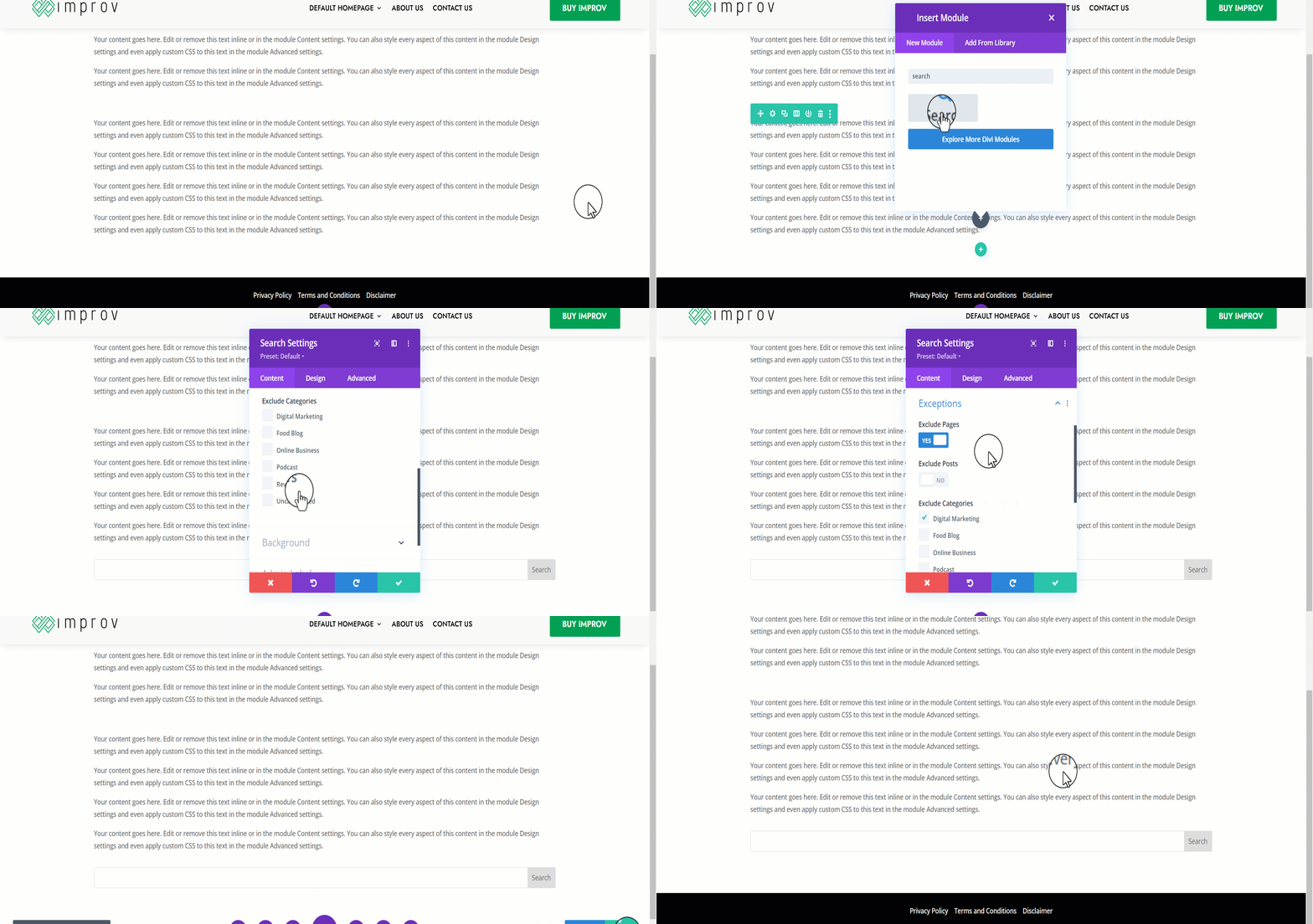
exclude pages in search result in Divi
  • Save the module settings
  • Save the page

Now, the next time you view your page and search in the search results module, pages will be included in the search results.

Still under the “Exceptions” toggle, you can choose to exclude posts from certain categories. This is a feature you can use to display only certain posts in the search results pages within your Divi website.

I hope that you enjoyed this tutorial. Subscribe to Divi Banks on YouTube and join our newsletter for more crisp content on WordPress and web design.

Shop Divi Products

Buy nicely done Divi Layouts, Child themes, and extensions for your next Divi project.

Related Articles

How to Add Padding Around Featured Images in Divi’s Blog Module

How to Add Padding Around Featured Images in Divi’s Blog Module

If you're using the Divi theme for your WordPress website and want to customize the appearance of your blog posts page, one simple tweak you can make is adding padding around the featured images. This can help create a more visually appealing layout and better...

Divi Logo Guide: Everything You Need to Know

Divi Logo Guide: Everything You Need to Know

A professionally designed logo is a powerful branding asset that can leave a lasting impression on your website visitors. Research shows that a well-designed logo can boost consumer trust in a brand by an impressive 75%. But the question most people ask is – how do...

Leave a Comment

0 Comments

Submit a Comment

Your email address will not be published. Required fields are marked *

WP101 - FREE WordPress Tutorials

Enter your email address below to gain access to the FREE WordPress training.

You have Successfully Subscribed!

Pin It on Pinterest