

The updates include:
- New and improved features
- Security updates
- Bug fixes
As a WordPress website owner, it is important that you always keep the WordPress core, WordPress Themes, and plugins updated. Doing so will ensure that you maintain a secure website.
Before Updating Divi Theme
The first step to updating a WordPress Theme is to first take a backup of your website.
That way, you will be able to restore your site should anything go wrong after the update (and if the rollback option also fails).
You can use any of the many free WordPress backup plugins to take back-ups of your Divi website. I use the free version of Updraft Plus to back-up my sites into a Google Drive. It’s very easy to set up and also to restore the site whenever there’s need.
I would recommend that you test your backups are set up correctly and you know how to restore them using the plugin before the need to do so comes up.
Update Divi theme
To update Divi theme, ensure that the Divi license is activated on your WordPress website. You need the API Key to activate a Divi license. You can find the API Keys from your Elegant Themes member’s area.
The tutorial, How to Install Divi theme and Activate License, will show you how to exactly download, install and activate Divi Theme license.
Once you have activated the Divi license, you can now go ahead and update your Divi Theme to the newer version.
Go to: Dashboard > Updates (or alternatively: Appearance > Themes), choose Divi and click “Update Themes”.
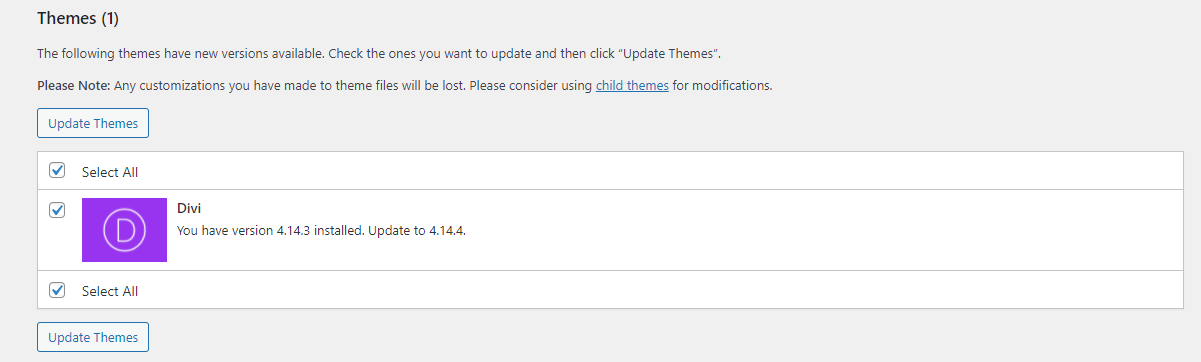
And that’s it. Your Divi theme should be now updated.

0 Comments