
Divi Child Themes and Layouts on SALE!! Shop Now →.
Business Coach Layout
Getting Started
Before we begin, make sure you have Divi Theme installed on your WordPress website before importing this layout.
The Divi theme is not included in this package. To download Divi, you must have an Elegant Themes Membership. If you don’t have the membership, follow this link to acquire one.
Importing Business Coach Blog Layout
Once you have downloaded the Business Coach Blog Layout zip file, unzip the file then locate the Business Coach Blog Layout.JSON file.
Go to Divi>>Divi Libray. Then at the top of the page, click on Import & Export. A new window will come up. Click on the Import tab, then choose the file Business Coach Blog.json, then click on Import Divi Builder Layouts.
This process will import the page layout and save it to your Divi Library and make it available for your use.
To use a saved layout from Divi Library, create a new page, say Blog, then load the layout (Business Coach Blog Layout) saved in the Divi Library.
Here is a video on how to load any page from Divi Library.
https://www.youtube.com/watch?v=AKsrEXWfiaY
Customizing The Layouts
Install These Plugins
For this layout to work for you, you need to install two major WordPress plugins, the Yoast SEO plugin, and Social Warfare.
After you have installed the plugin, go to your WordPress dashboard to enable the breadcrumbs in the Yoast SEO settings.
Go to SEO >> Search Appearance >> Breadcrumbs then scroll down to toggle the enable button. Then click Save.
Create a Custom Widget
You will need to create a new custom widget and name it widget1 (no spaces).
Navigate to Appearance >> Widgets, enter widget name then click create.
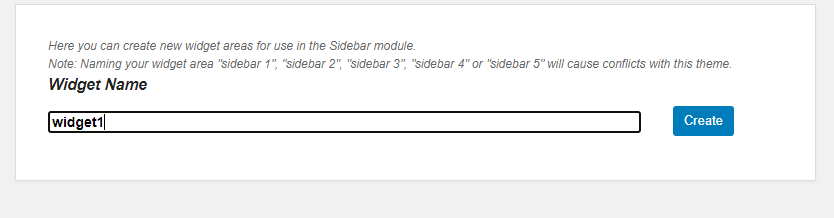
Reload the page to be able to see the newly created widget.
Populate widget1 area with Latest Posts widget.
Create a second Widget and name it widget2. Populate it with the Categories widget.
The CSS and Script
The fun part.
For this layout to look exactly the way it is in the demo, the Custom CSS and script files used in this layout have been included within the Layout. The modules have been named CSS Code and Script Code respectively. You can edit the CSS code to match the color theme of your website.
Importing The Bonus Assets
The Business Coach Layout comes with the following assets as a bonus:
- Single Post Layout
- Category Page Layout
- Search Result Page Layout
- 404 Page Layout Page
These are Divi Builder Templates.
To import a Divi Builder Template, click on the portability icon within the Divi Builder to launch the portability system. Navigate to the Import tab. Click the “Choose File” button and locate from your previously downloaded files, i.e Single Post Layout.json file, and click the “Import Divi Builder Layout button.”
Repeat the process for the remaining templates: Category Page Layout, Search Result Page Layout, and 404 Page Layout.
Here is a short video on how to import Divi Builder Templates:
https://www.youtube.com/watch?v=srtRZE1TU28
Once you are done, click on the Save Changes button.
If you still need help importing and customizing this layout, do not hesitate to contact us.