
Are you looking to build a website with the Divi Theme? If so, you’ve come to the right place. In this blog post, we’ll discuss the various steps and benefits of building a website with the Divi Theme.
We will cover the benefits of using Divi Theme, choosing a web host, installing WordPress and Divi Theme, designing your website with Divi Theme, adding content to your website, and finally, launching your website.
Note:
This tutorial is focused more on Divi. If you are new to WordPress, I recommend you to check out my other tutorial on how to build a website with WordPress. Also, if you don’t have the time or skills to build your website with Divi, you can hire me to do it all for you.
I will gladly help you.
With the help of this blog post, you will be able to create a professional website with the Divi Theme in no time.
Building a professional, eye-catching website is easier than ever, with modern web design tools removing the need for coding skills. With flexible drag-and-drop page builders like Divi leading the way, anyone can design beautiful websites for their brands. But with several themes and page builders now available, what sets Divi apart specifically for building stunning websites?
Divi by Elegant Themes provides a blend of both accessibility for total beginners plus profound customization potential for experts. Intuitive visual editing tools allow anyone to translate their exact web design vision into reality without touching code.
However, developers can still flex their skills and customize virtually endless elements. Alongside innovative templates and pre-made layouts allowing beginners to hit the ground running, Divi still offers constant control to seasoned pros.
In this guide, we’ll explore precisely why Divi is the best premium theme for building WordPress websites, whether you have yet to gain web design experience or want to grow custom functionality over time.
Let’s dive in.
Prerequisite
Before we proceed, it is important that you understand the following:
Why Use Divi Theme for Your Website
Divi Theme is one of the most popular WordPress themes available, and for good reason. It is incredibly powerful and versatile, making it the perfect choice for creating a website quickly and easily. Here are some of the benefits of using Divi Theme:
Intuitive page builder: Divi’s standout feature is its easy-to-use drag and drop builder. Instead of dealing with code, you can point, click, and add elements visually.
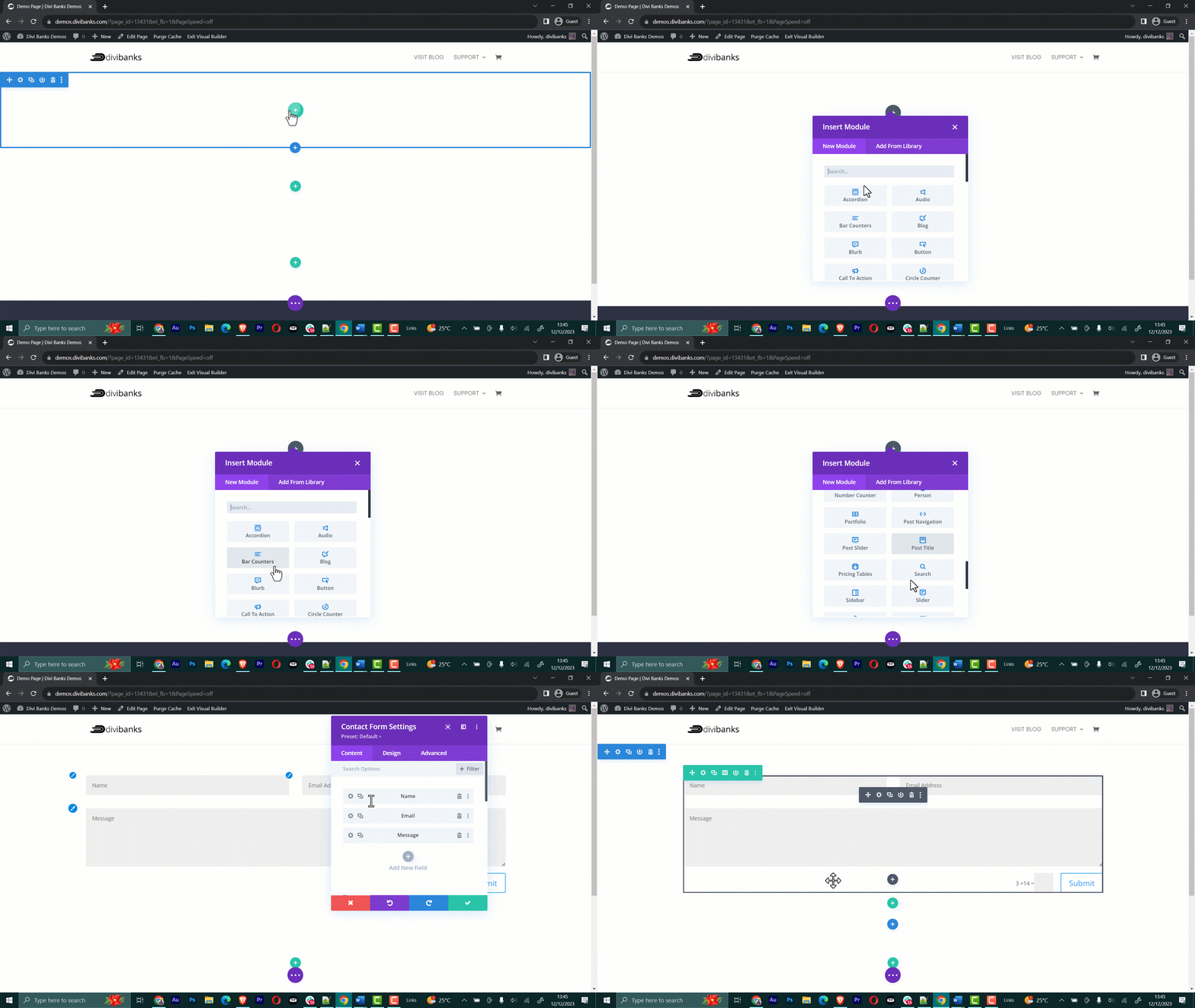
No design experience needed: Divi has beautiful pre-made layouts and templates so you can get a head start on design. The pre-built modules also ensure great design.
Responsive mobile-friendly websites: Websites made with the Divi Builder look fantastic on all devices and screen sizes automatically.
Great for beginners and pros: Divi balances simplicity for beginners with powerful options for seasoned developers.
Endless customization: While pre-built options allow beginners to build quickly, experts can customize everything.
Pre-Built Layouts: Divi Theme includes dozens of pre-built layouts that you can use to get started quickly. This makes it easy to create a website without starting from scratch.
SEO Optimized: Divi Theme is optimized for search engines, making it easier for potential customers to find your website.
Awesome support: As a premium WordPress theme, Divi includes exceptional customer support to help you if you get stuck. Plus, there is a huge community of Divi users and a bunch of tutorials that you can always refer to when stuck.
With the Divi Builder’s user-friendly interface and pre-made elements, building a site is simple. But Divi still allows for infinite customizations and growth for more advanced websites.
Choosing a Web Host
Choosing the right web host is the most critical decision when launching a website. Your web host will provide the platform to store your website’s files and ensure your website is available to visitors 24/7.
With so many web hosting providers to choose from, it’s important to understand the different types of hosting and the features they offer.
There are three main types of web hosting: shared hosting, VPS hosting, and dedicated hosting. Shared hosting is the most affordable option and is ideal for small websites or blogs. With shared hosting, your website will be hosted on a server with other websites.
VPS hosting is more expensive than shared hosting but offers more control and flexibility. VPS hosting also gives you access to your virtual server, which is ideal for medium-sized websites or businesses.
Dedicated hosting is the most expensive option but provides the most control and resources. Dedicated hosting is best for large websites or companies that need a lot of resources.
When choosing a web host, it’s important to consider the features they offer. Look for a web host with reliable uptime, unlimited bandwidth, and a secure hosting environment.
Many web hosting providers offer add-ons such as SSL certificates, domain name registration, and website-building tools. Choosing a web host that provides customer support if you need help with your website is also important.
By taking the time to research the different web hosting options, you can ensure that your website runs smoothly and is available to visitors 24/7.

Web Hosting Providers We Recommend

Eco Web Hosting
Eco Web Hosting is considered the king of the web hosting world with a free domain for the first year and comes with 24×7 help support.

Flywheel
Managed WordPress hosting built for designers and creative agencies. Build, scale, and manage hundreds of WordPress sites with ease on Flywheel.

Paluhost WS
If you need fast, reliable and eco-friendly hosting, look no further than the King of Green itself – Paluhost WS. The planet will thank you!
How to Install Divi Theme
Installing Divi takes just a few minutes. First, you will need to download Divi theme files from your Elegant Themes membership account. If you don’t have an account yet, I highly recommend you take advantage of their Yearly Access for only $89 per year. That’s less than $7 per month (though you’re billed annually) and for that reasonable sum, you’ll be given access to the Divi theme, Extra Theme, as well as their two Premium plugins, the Monarch plugin (to enhance your social media sharing) and the Bloom plugin (to enhance your site’s opt-in box and to increase your overall number of opt-ins).
Here are the steps:
Once you have downloaded Divi Theme files to your computer storage:
Log in to your WordPress website’s admin dashboard.
- Click on “Appearance > Themes”.
- Click “Add New Theme > Upload Theme”.
- Click “Choose File” then search for Divi theme files (.zip) and click ‘Install Now’.
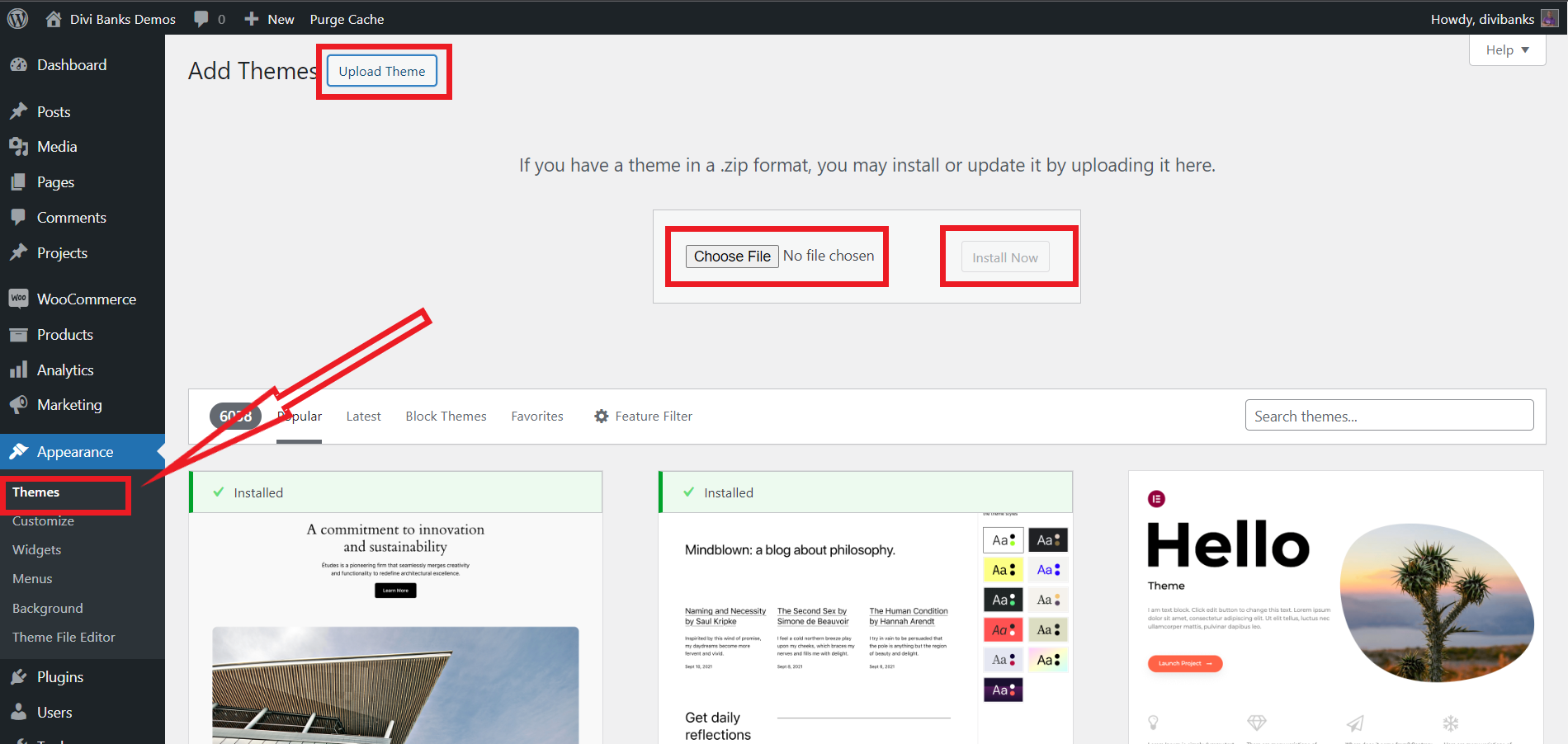
Once installation completes, click “Activate”.
Upon activation, the Divi Builder plugin will automatically install.
Activate Divi License
The creators of Divi Theme, Elegant Themes, keep updating Divi Theme every now and then. The new version is always better than the previous one. To keep receiving new updates, you will need to activate the Divi License.
Go to Account >> API Keys.
Now, go to your WordPress Admin dashboard with the Divi Theme installed.
On the left bar, click on Divi >> Theme Options.
Click on the “Updates” tab. You will be taken to a screen that looks like this:
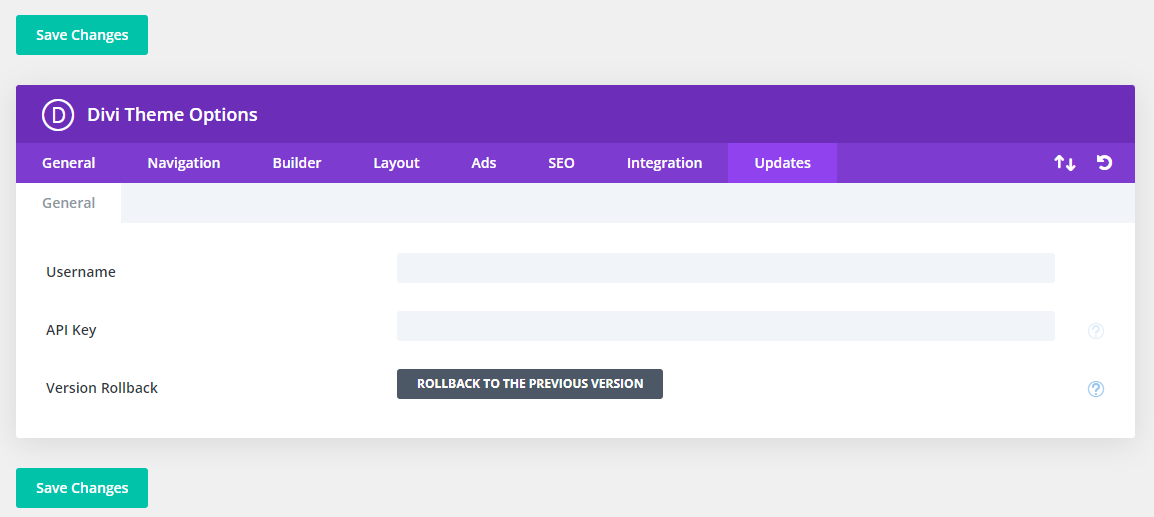
Copy and paste the Username and the API Keys from the Elegant Themes Member Area.
Click on “Save Changes” and that’s it.
You now have a Divi Theme installed, activated, and ready for use.
And that’s it! The Divi interface will then replace your traditional WordPress backend. Now you can start designing your site’s homepage directly within the Divi Builder.
How to Build a Website With Divi Theme
The Divi theme page builder utilizes a nested organizational structure. The largest components are sections, which stretch across the webpage. Sections house rows inside them, allowing for multiple rows within each section. The smallest components within the rows are modules – individual elements like images, text, and more to build your page.
To organize your page, you can customize the names of sections and modules. This labels them for easier identification later.
Visually differentiating the components, sections appear in blue along the left border. Rows display green on their left edge, while modules show grey on their left. This colour coding allows quick recognition of the sections holding rows holding modules that compose each page made with the Divi builder.
If you switch to wireframe view, here is what you will have:
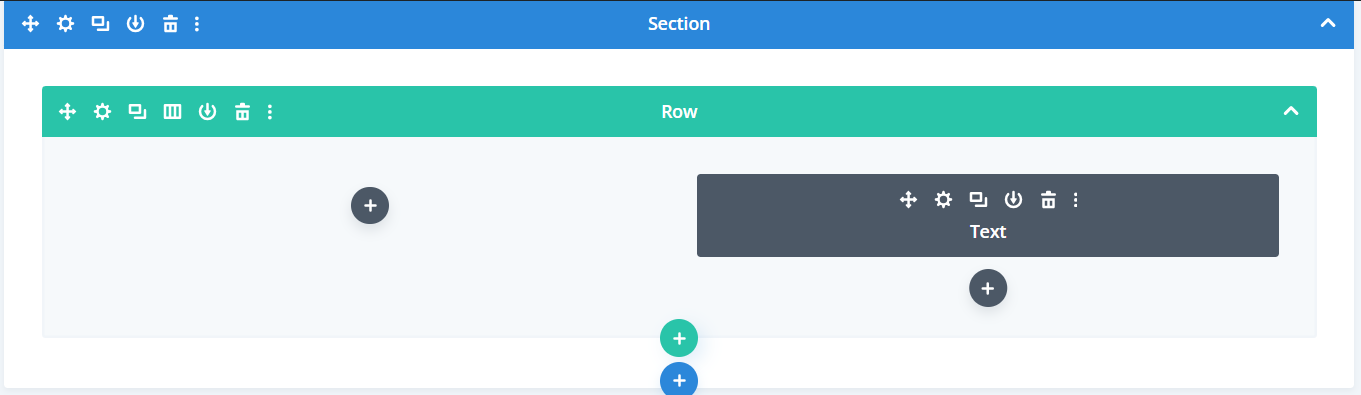
From the above wireframe view, you can clearly see that the page has one section. The section contains a 2-column row. And, there is a text module on the left column.
Building a web page in Divi starts by adding your first section, which comes with a single row by default. Before inserting modules, you’ll want to configure the rows by choosing the column layout.
Several column layouts are available for each row. You can have one full-width column, two halves, four quarters, or any fractional split like thirds.
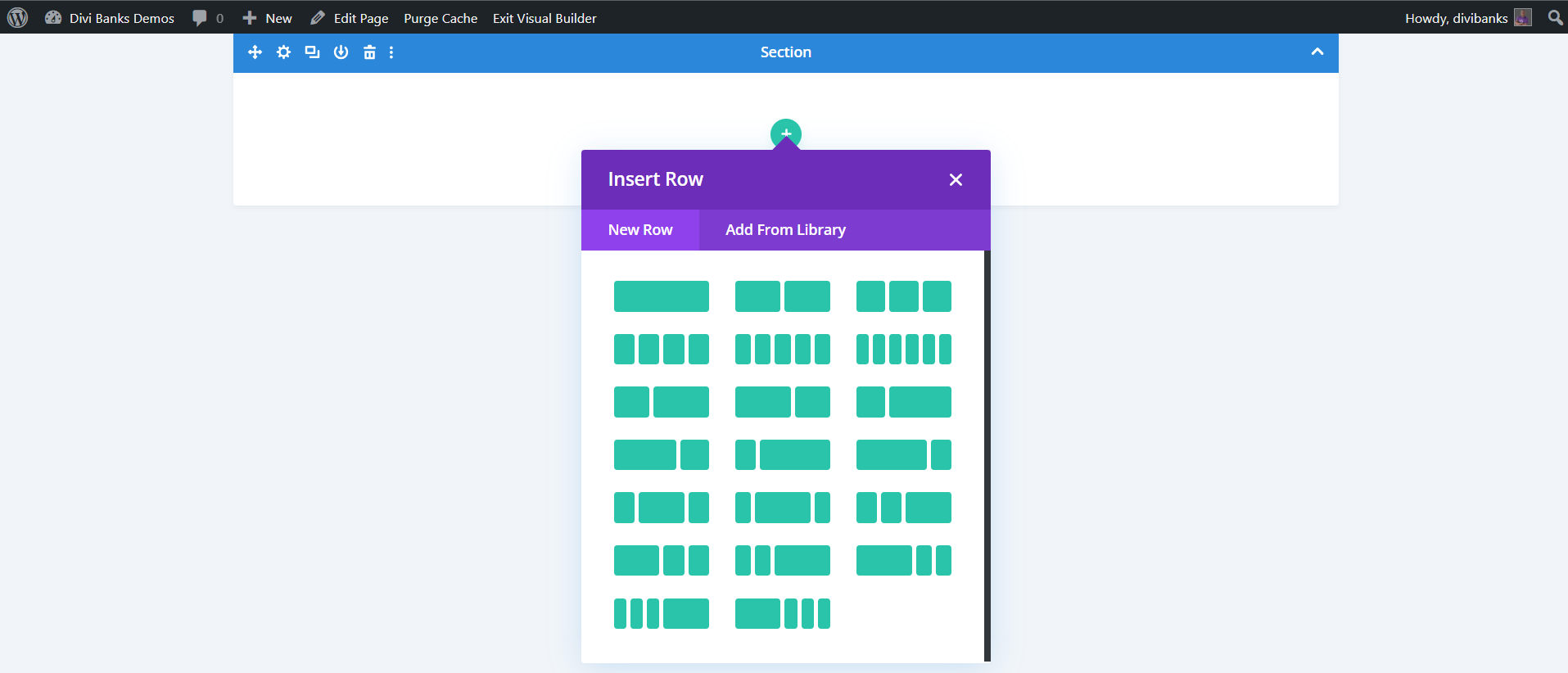
Combining different arrangements gives flexibility in structuring your page. If you select the two-column option, for example, you’ll see two boxes appear within the row where you will be able to insert modules.
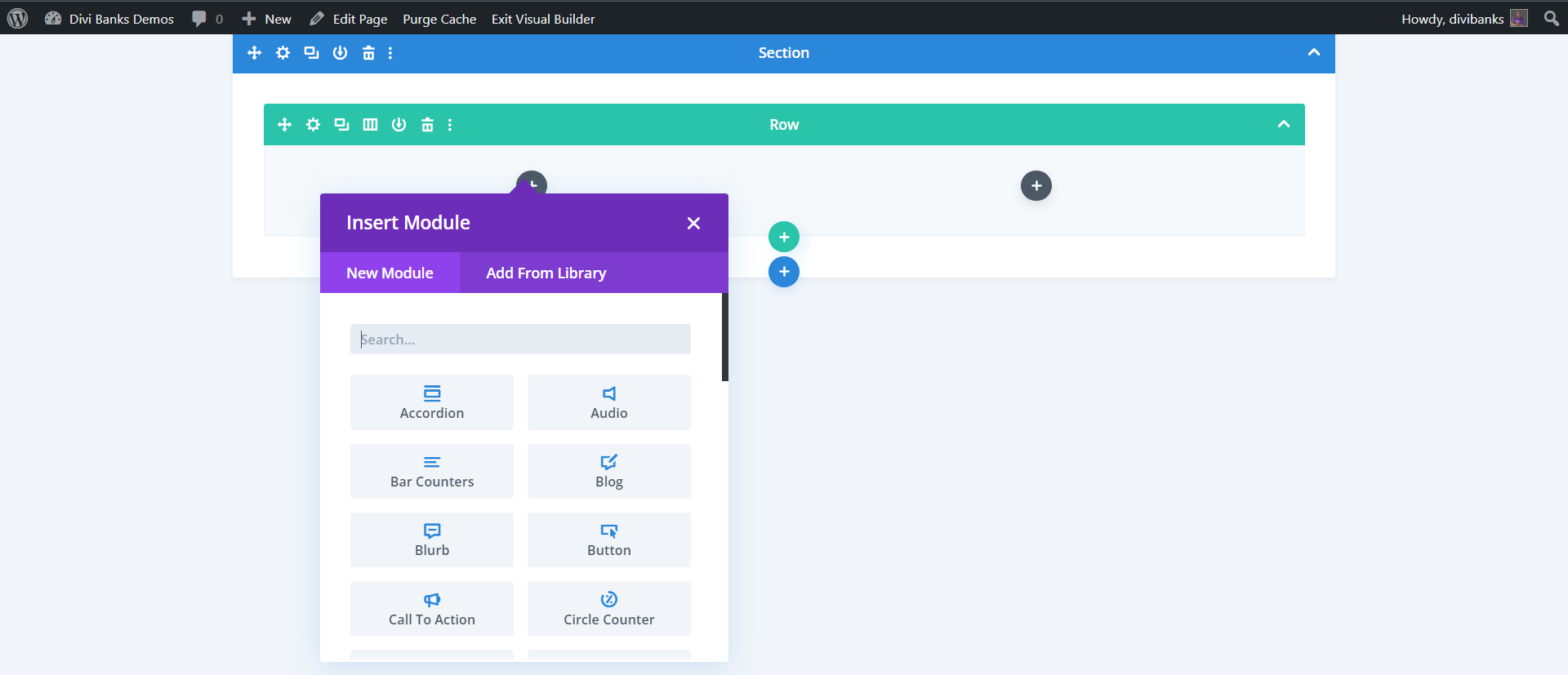
And modules are where the real customization comes in. The extensive module list lets you add pretty much anything imaginable to your site. Basic building blocks include text, images, blurbs, and sidebars. But you also have advanced modules like blog posts, calls to action, tabs, counters, contact forms, testimonials, and even full pricing tables.
Just click the desired row and select “Insert Module” to access the module library so you can start building out your page’s content.
Here is an example with a 2-column row containing text and button modules to the left and image module to the right.
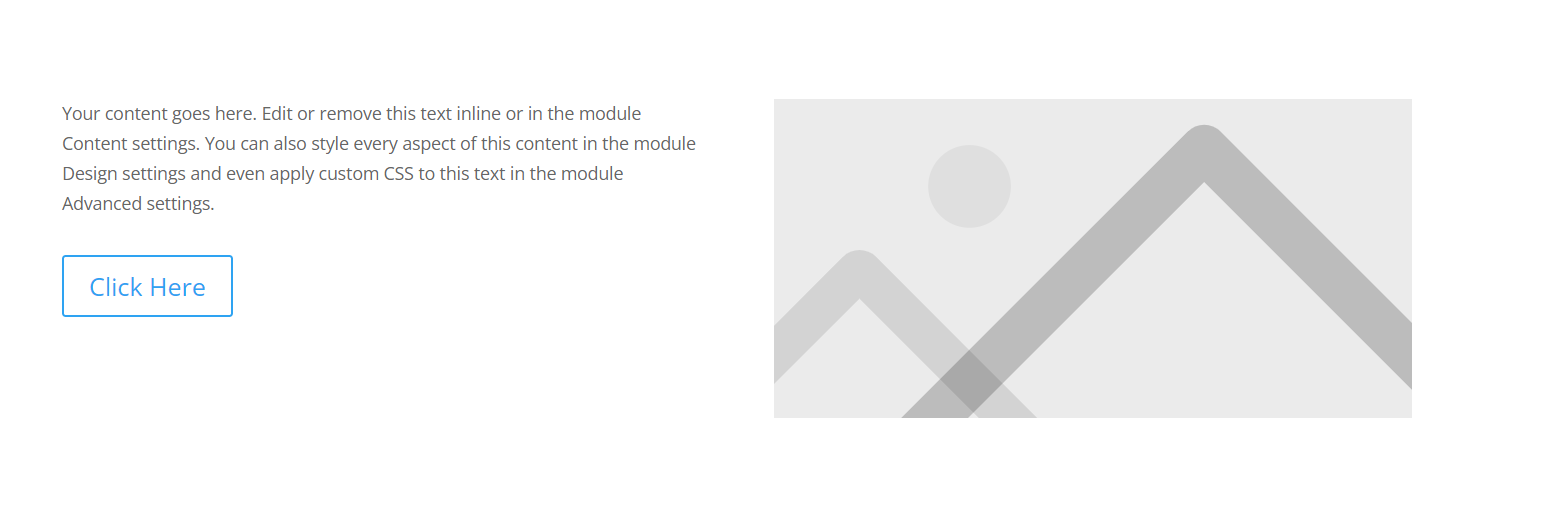
The key with Divi is assembling the framework with sections and rows first. Once those structural elements are in place, the modules plug into them to add your actual content. With all the sections, rows, columns and modules at your fingertips, Divi gives immense flexibility in customizing elegant pages.
Adding modules in Divi is intuitive with inline editing. Click any module and its settings appear instantly for filling in things like images, text, links, animations, etc. Only the necessary fields are shown for that module type. An image module, for example, will have image URL, alternate text, link URL, animation, and so on. You only have to fill in what makes sense, like skipping the link URL if you don’t want the image linked.
What makes Divi powerful is that modules remain flexible after creation. Newly added modules can be dragged and dropped across different rows or sections with ease. This free movement means layouts can evolve organically without getting stuck to a rigid structure early on. You can craft, refine, and reorder your page until the layout clicks.
Below every section, row and module are insertion buttons that make building up a site fast and painless. Keep adding sections that hold rows that hold modules until you have a visually stunning, custom web page – no coding expertise required.
With this intuitive, modular system, Divi makes it simple for anyone to craft beautiful websites that rival pro designs.
How to Create a Mobile-Friendly Site
Modern websites must offer an excellent experience on smartphones and tablets, not just desktops.
Thankfully, Divi makes mobile-friendly sites automatically with:
- Responsive module resizing
- Smart mobile navigation and menus
- Optimized customizable mobile breakpoints
- Mobile-focused interactions and effects
- Cross-platform previews directly in Divi
Smart responsive sizing makes your desktop designs seamlessly translate to smaller devices. Breakpoints allow controlling designs independently per screen size.
Finally, Divi’s new Wireframe preview shows you device mockups. Use the built-in Cross-Device Preview to see your designs on actual device screen sizes in real time.
Together, these powerful features take the work out of mobile optimization across platforms.
Websites Powered by Divi
To see Divi’s full potential, check out these case studies and live sites:
- The Georgia Association of Regional Commissions (GARC)
- Plan Source
- Western Oregon University
- Quora for Business
From international brands to local businesses, Divi empowers any level site in every niche to craft optimal online experiences leveraging WordPress.
FAQs
What are the limitations of Divi?
Divi has no limitations compared to directly coding a custom theme. Unlimited custom CSS can expand possibilities further. Extensions augment functionality like eCommerce. As a premium theme updated regularly, Divi evolves with WordPress and avoids obsolete tech issues.
Does Divi work with all WordPress plugins?
Yes. As a native WordPress theme, Divi works with all properly coded plugins, extensions, and third-party integrations. Leading options like WooCommerce are specifically supported.
Can I make changes to Divi site designs after launch?
Absolutely. With the Divi Builder, sites aren’t static. You can easily rearrange, add, customize, and update content and design elements on launched sites anytime.
What if I run into trouble building my site?
As part of Divi’s premium theme package, you get exceptional tech support with 24/7 customer service, detailed documentation libraries, and an active community forum. Support reps can provide personalized Divi guidance for any hurdles during the site-building journey or after launch.
Is Divi SEO-friendly out of the box?
Yes. Divi comes preloaded with WordPress best practices for on and off-page optimization. Add SEO plugins to augment organic rankings further. Or work with Divi’s dedicated SEO team for custom optimizations.
Conclusion
Thanks to its user-friendly drag-and-drop builder, pre-made templates and modules for rapid site-building, and expansive customization controls for unique branding, Divi truly empowers anyone to craft stunning websites without limitations, even as your vision grows.
From absolute beginners looking to avoid coding entirely to seasoned developers wanting extreme control, Divi balances usability with endless possibilities. Support for all WordPress functionality, like plugins, keeps unlocking new features simple.
Now that you know about utilizing Divi’s immense power for visualizing and building your ideal website iteration by iteration, it’s time to begin your web creation journey. Install Divi on your WordPress site and breathe new life into your online presence armed with these tips and tricks today.

0 Comments